[Cargo Information] Entering Sea LCL and Air Cargo
Automatically translated from Korean.
What you can do
You can enter sea LCL cargo, where a container is shared with other cargo, and air cargo by package unit.
Enter the package type, quantity, length, width, height, and weight, and the volume and chargeable quantity are calculated automatically.
You can enter dimensions in cm or inches and weight in kg or lb, whichever is more convenient.
How to use it
In Step 2, “Cargo Information,” check the mode of transport. If it is between ports, select “Sea LCL”; if it is between airports, air transport is set to “Air Transport · Automatically Selected Based on Origin/Destination.”
Enter the “Product Name” and “HS Code.” The entry method is the same as in the “[Cargo Information] Entering Sea FCL Cargo” article.
Select the “Package Type” (pallets, cartons, etc.) and enter the “Quantity.”
Enter the “Length,” “Width,” “Height,” and “Weight” for one package. The chargeable quantity per package (R.TON for LCL and C.W for air) and the total CBM and total kg are calculated below. The total chargeable quantity (for example, “Sea LCL 18.00 R.TON” or “Air 160.3 C.W”) appears as the mode of transport in the request summary.
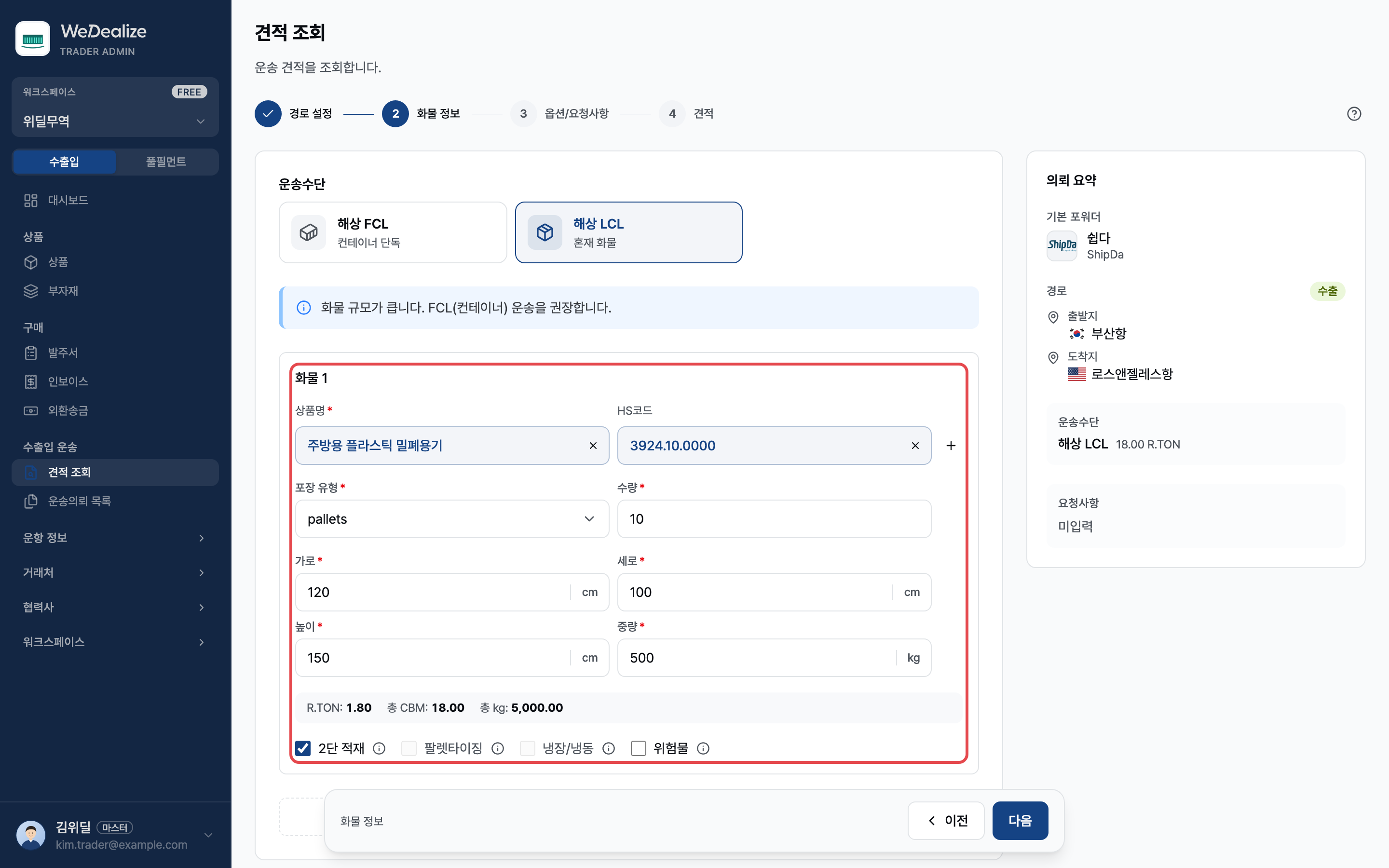
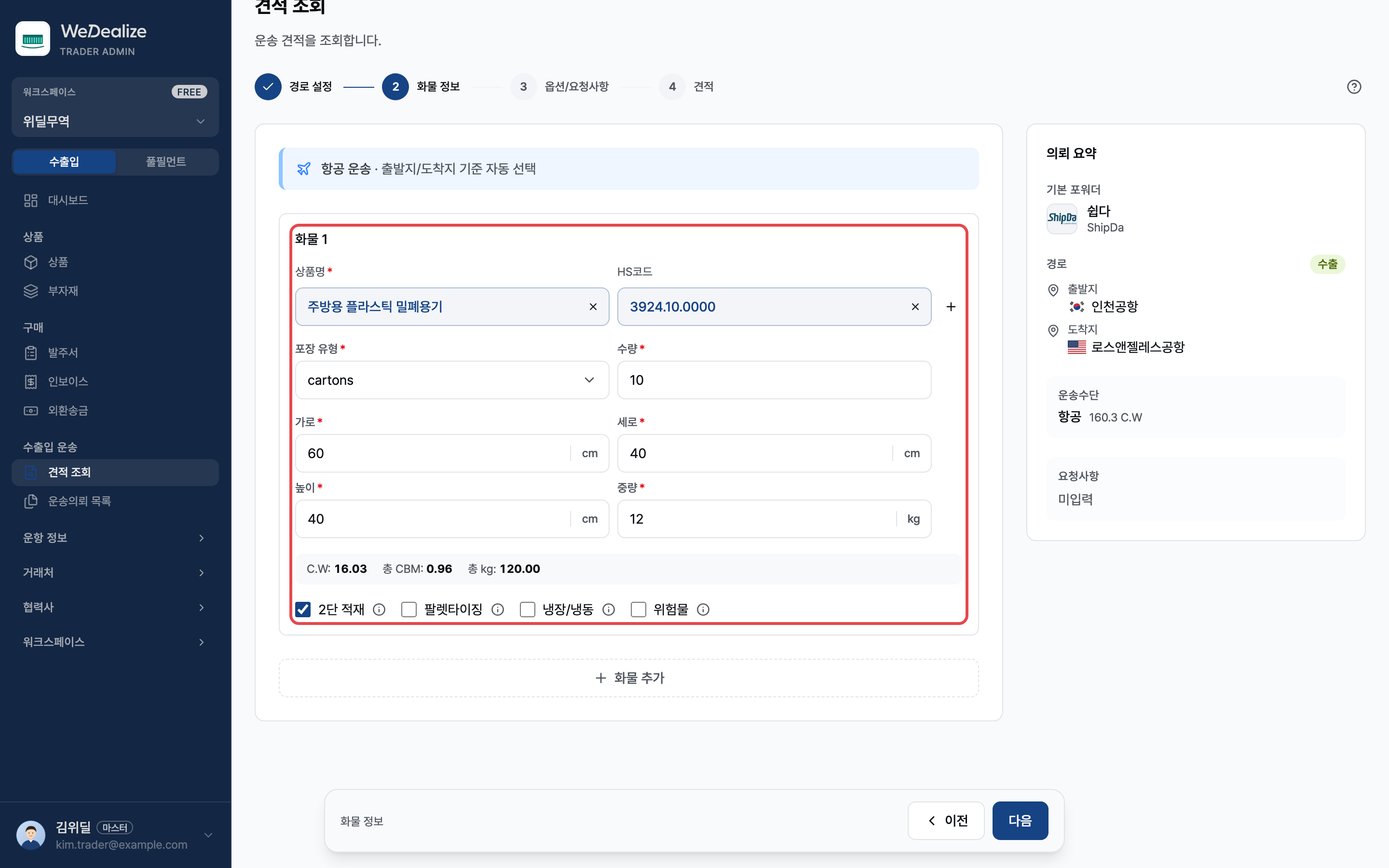
If other cargo can be stacked on top, leave “Double Stacking” selected. If it cannot be stacked, uncheck it.
Frequently asked questions
What are R.TON and C.W?
They are the chargeable quantities used to calculate freight. For sea LCL, freight is calculated based on the greater of volume (CBM) and weight (tons) (R.TON); for air, it is based on the greater of actual weight and volumetric weight (C.W).
“The cargo volume is large. FCL (container) transport is recommended.” appears.
This message appears when the total LCL cargo is 15 CBM or more, or 10,000 kg or more. It means that using one container may be a better option, but you can proceed with LCL as is.
I want to enter dimensions in inches and weight in lb.
Tap “cm” to the right of the dimensions field or “kg” to the right of the weight field to switch them to “in” and “lb.” The dimension unit applies to all dimension fields for that cargo.
Why am I asked about “Double Stacking”?
Because the space required varies depending on whether other cargo can be stacked on top, and this is reflected in the freight calculation.
What is “Palletizing”?
It means requesting that the cargo be consolidated onto pallets at the origin. The number and dimensions of the pallets after consolidation are determined after being measured on site, so you do not enter them now. It cannot be selected if the package type is already pallets.
My cargo is refrigerated or frozen.
For air transport, check “Refrigerated/Frozen” and enter the “Minimum Temperature” and “Maximum Temperature.” Sea LCL does not support refrigerated/frozen cargo because multiple shippers share the same container.