[My Account] Delete Account
Automatically translated from Korean.
What you can do
You can delete your WeDealize account. Account deletion cannot be undone.
Any workspace that you used alone will also be deleted when you delete your account.
You can sign up again with the same email address.
Steps
Bottom left: click your name → open 「My Account」. On mobile, tap ☰ → the row with your name at the top of the menu.
At the bottom of the 「Profile」 tab, click 「Delete account」 under 「Account deletion」.

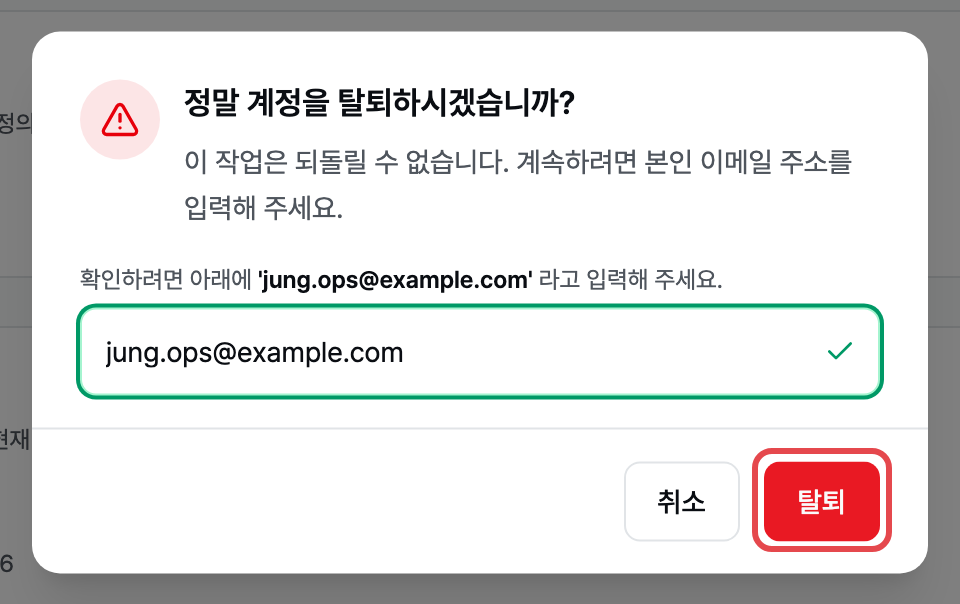
Enter your email address exactly as shown in the confirmation window. You can click 「Delete」 only if the email address matches.
Your account will be deleted immediately when you click 「Delete」. The screen will switch to the login screen.
Frequently asked questions
It says, 「Transfer permissions or remove members, then try again.」
You cannot delete your account if there are other team members in a workspace where you are the master. First transfer the master role to another team member or remove all team members. See the articles 「[Manage team members] Transfer master role」 and 「[Manage team members] Remove team members」.

Can I delete my account if I have requests in progress?
You cannot delete your account if a workspace where you are the master has requests in progress, unpaid invoices, or an active paid subscription. Complete everything first, then try again.
What happens to workspaces I joined as a team member?
You will leave those workspaces. The workspaces and their data will remain.
What happens to logins on other devices?
You will be logged out of all of them.
Will my previous data come back if I sign up again with the same email address?
No. Signing up again will create one new workspace. To rejoin a workspace you previously belonged to, you must be invited again from that workspace.