For this shipment, how far has customs clearance progressed?
You ask your customs broker, or check the Korea Customs Service lookup yourself.
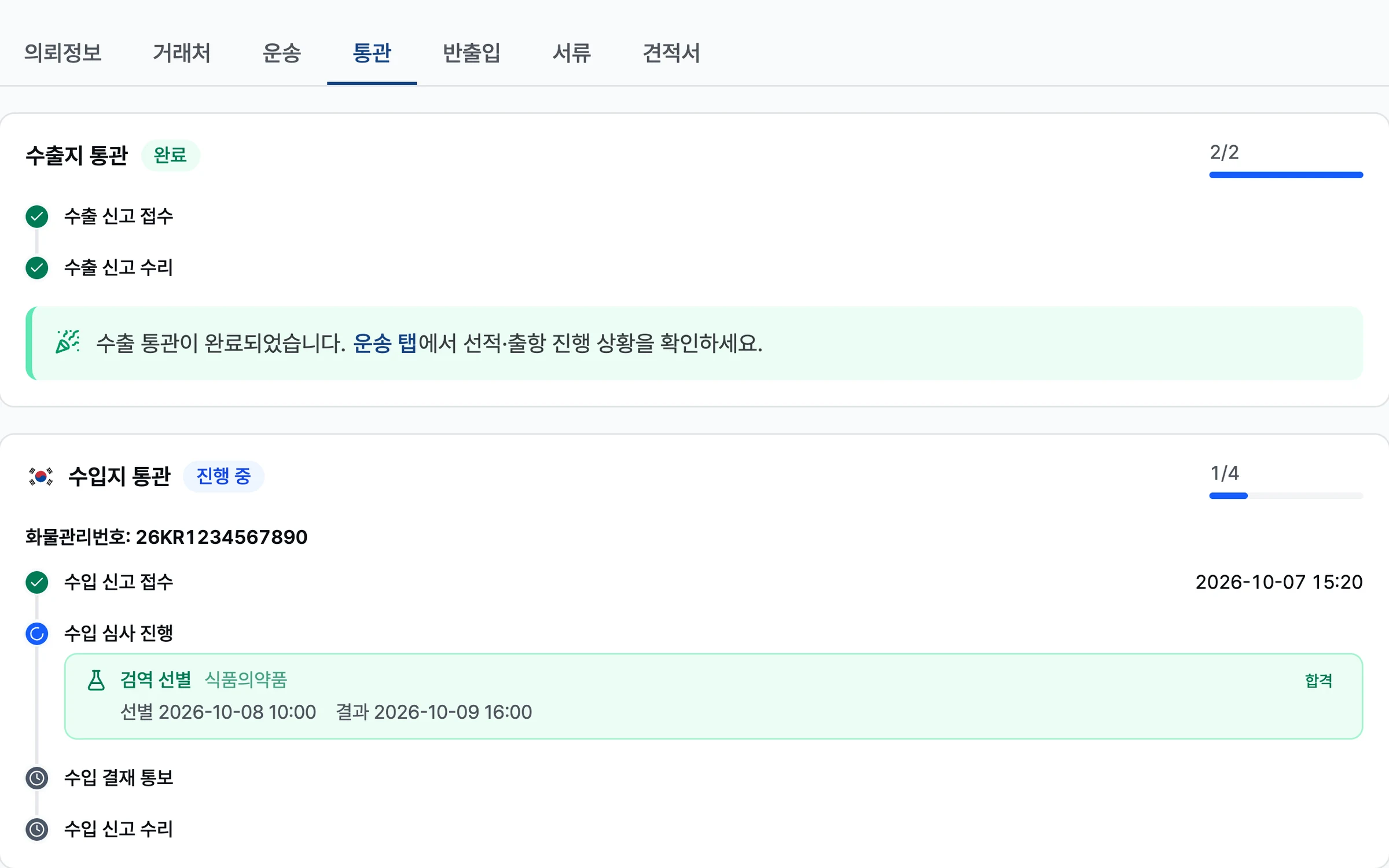
From declaration stages to inspection results,
updated automatically for each shipment.
Leave your details and we will email you the brochure. You can also request a consultation.
You ask your customs broker, or check the Korea Customs Service lookup yourself.
Learning about a selection late means rescheduling what comes next.
You find customs documents in your broker’s emails and file them separately.
Customs progress, inspection selections and the declaration are only known by asking your customs broker.
See customs progress for each shipment, without separate inquiries to your customs broker.
The current stage of import and export declarations, with processing times, is shown for every shipment.
Selections, results and days elapsed on open inspections are shown for every shipment.
Your customs broker and documents uploaded by your forwarder are shown for every shipment.
Declarations
See the current stage of the import declaration without separate inquiries.
Without separate checks, see whether the export declaration has been accepted before loading.
Inspections
Learn about selections early so you can plan what comes next.
Spot customs delays from long inspections or failed results.
Brokers & Documents
See the customs broker and their main contact for each shipment, without looking them up.
Download declaration certificates whenever you need them, without searching broker emails.
More you can do
If a shipment is declared in several parts, see progress separately for each declaration number.
When your forwarder requests documents needed for customs, they appear as action items so you don’t miss them.
Once import customs is cleared, continue to cargo release status to see whether the cargo has left.
Learn moreIf you already work with a customs broker, assign them to the shipment and their details are shared with your forwarder too.
Customer stories
“We check whether the export declaration is accepted before loading, without separate inquiries”
As a chemical exporter, we often need to confirm that the export declaration has been accepted before loading. We used to ask our customs broker and look for the export declaration in emails to file it separately. Now we check declaration progress for each shipment and download the export declaration uploaded by our forwarder in one place.
“Knowing about inspection selections early, we adjust inbound schedules ahead of time”
Importing cosmetics from overseas, our cargo is sometimes selected for inspection during customs. We used to learn about selections late and rush to change inbound and sales schedules. Now we check declaration progress and inspection selections for each shipment and plan ahead.
Connected services
Trade AI
From assigning a customs broker to attaching customs documents, handle it in chat. Requests that change data are applied after confirmation.
If you request customs brokerage, the customs broker assigned by your forwarder handles it; if you clear customs yourself, your own customs broker does. You can see the progress for each shipment.
When you request a quote, you can choose brokerage for export customs and import customs separately. For customs you handle without our brokerage, you can assign the customs broker you already work with to the shipment, and their details are shared with your forwarder.
Updates start once a tracking number such as a B/L or AWB is registered for the shipment. Press the refresh button in the shipment details to load the latest customs information.
For exports, Korea Customs Service only provides whether cargo is subject to inspection, so the physical examination selection is shown. The inspection is marked complete once the declaration is accepted or departure is confirmed.
Automatic updates are currently available for customs in South Korea. Customs in other countries is not updated automatically yet; more countries are planned.
Get the brochure or request a consultation.