
Payments, shipping and landed cost, all in one place for each order

Manage purchase orders on a single reference, without matching scattered records one by one.

Purchase Orders brochure request

Leave your details and we will email you the brochure. You can also request a consultation.
Request a consultation
0/2000
Sample data
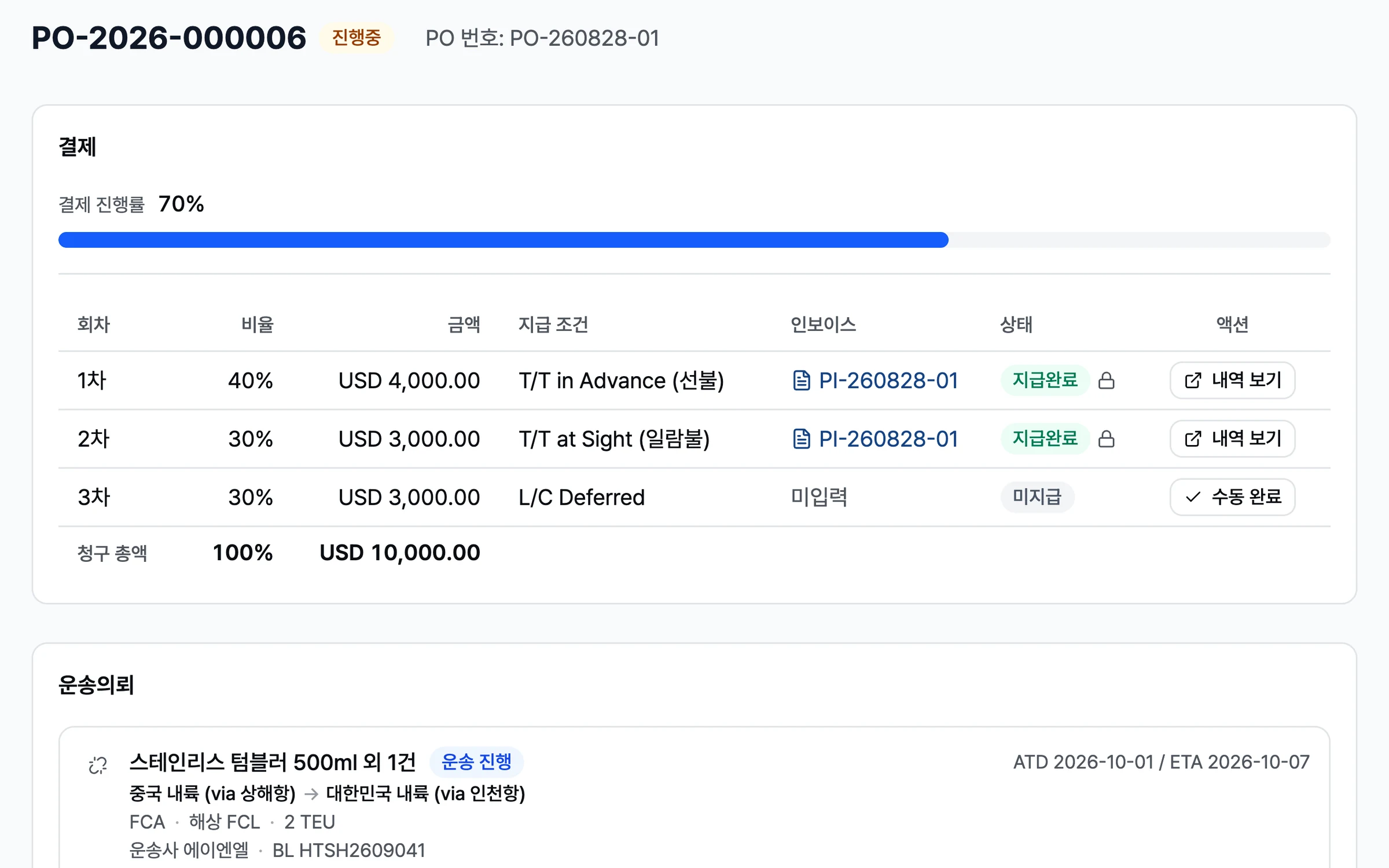
WeDealize trader purchase order detail — payment progress, status by installment, linked shipment (Sample data)
  1. 1PO number
  2. 2Payments
  3. 3Payment terms
  4. 4Import Shipping

Can you answer these questions right now?

  • Payments

    For this purchase, has the balance been paid?

    You match bank transfer records by supplier name and amount.

  • Import Shipping

    For this purchase, when will the goods arrive?

    You email the forwarder every time you need an update.

  • Landed Cost

    For this purchase, what did it cost in total?

    You collect payment, freight and duty invoices and calculate in a spreadsheet.

PO number PO-260828-01 from the supplier’s purchase order, remittance number RM-2026-000031 from the bank and B/L number HTSH2609041 from the forwarder are copied by hand into one row of an Excel PO tracking sheet. The B/L number is being typed now, and the copied numbers still have to be reconciled.

Payment and shipping records are kept apart from the order, with no single reference tying them together.

Manage payments, shipping and landed cost under one PO number

Give each order a PO number, and its remittances and shipments gather on that order.

PO-260828-01 (payment progress 70%) brings together payments (deposit and interim paid, balance due), import shipping (B/L HTSH2609041, departed Oct 1, ETA Oct 7, sailing) and landed cost (goods ₩13,500,000 + shipping and customs ₩3,600,000 = estimated landed cost ₩17,100,000 before settlement).

Orders & Payments

Add payment terms to the order and carry them through to payment

Order Registration

Register orders under the PO number you assign

Record and manage purchase details once exchanged by email, order by order.

  • English and Korean purchase order PDFs generated from the order details
  • Later remittances and shipments shown on the same order
Registering PO-260828-01 puts it in Created status and turns it into English and Korean purchase orders (total USD 10,000).
Payment Terms

Register deposit, interim and balance terms on the order

See what to pay next, and on what terms, right on the order screen.

  • Deposit, interim and balance amounts calculated from the ratios you enter
  • Extra supplier charges can be added to the billed total
Enter payment terms of 40% deposit, 30% interim and 30% balance, and the USD 10,000 total is automatically split into USD 4,000, 3,000 and 3,000.
Payments

Payments are recorded right on the order

See how much has been paid on each order without reconciling payment records separately.

  • Paid and due status shown for deposit, interim and balance
  • Each payment recorded with the supplier invoice

You can pay by international transfer. Card payment (PG) is coming soon.

The PO-260828-01 payment record logs the Sep 1 deposit of USD 4,000 and the Sep 24 interim payment of USD 3,000 sent by remittance as paid, each with invoice PI-260828-01; the balance of USD 3,000 is due. Dates are sample data.

Import Shipping

Link shipments to orders and track them to arrival

Import Shipping

Link import shipments to the order

See when each order will arrive on the order screen, without separate inquiries.

  • B/L number and departure and arrival dates shown on the order
  • Shipping status shown on the order

Import shipments requested on WeDealize can be linked.

A shipment is linked to PO-260828-01, which is in progress, showing B/L HTSH2609041 with its schedule (departed Oct 1, ETA Oct 7).
Order Status

Payment and shipping progress update the order status

Know how far each order has gone without editing a status spreadsheet.

  • Payment progress updates when a payment completes
  • Order status changes as the import shipment progresses
Payment progress of 70% and the sailing status of the import shipment are reflected automatically on PO-260828-01: the order is in progress with 70% paid.

Landed Cost

Gather costs on the order and calculate total landed cost

Landed Cost

Calculate landed cost from the costs gathered on the order

See landed cost per order without collecting invoices in a spreadsheet.

  • Goods payments recorded on the order included automatically
  • Freight, duties and other charges of linked shipments added automatically
Goods ₩13,500,000, freight ₩1,200,000, duties and VAT ₩2,100,000 and other charges ₩300,000 add up to an estimated landed cost of ₩17,100,000. It is an estimate until settlement.

More you can do

Situations we also support

  • Register from a PO file

    If you manage purchase orders in an ERP or other system, upload the file and the details fill in automatically.

  • ERP integration

    If uploading file by file is a burden, the order open API exchanges order and shipment data with your ERP automatically.

    View the order APIAsk about integration
  • Split and combined imports

    Even when one order arrives in several shipments or several orders ship together, you see the B/L and shipping status for each order.

  • Cost per productComing soon

    If you need a unit cost to set selling prices, the order’s landed cost is allocated to each product.

Customer stories

Companies managing purchase orders with WeDealize

  • F&B import & distribution

    “Had we managed it in spreadsheets, we could never have handled 100 overseas brands”

    Within two years we came to trade with 100 overseas brands. Even with different payment terms for each brand, remittance records stay on each order, so payments never slipped. We link import shipments to orders too, and see each brand’s arrival schedule and payment progress on a single order.

    B Importer
    PaymentsImport Shipping
  • Global manufacturing & distribution

    “We check shipping status per order right in our own ERP”

    We integrated our in-house ERP with WeDealize orders. Without logging in to WeDealize, shipping progress for each order flows into the ERP, so our buyers see orders and shipments together on the screen they already use. Emailing forwarders for updates and copying them into spreadsheets is a thing of the past.

    H Importer
    ERP integrationImport Shipping

Connected services

Services that carry purchase orders through to sales

  • PaymentsFX remittanceSend supplier payments and check exchange rates and fees in advance.
  • PaymentsPG PaymentsComing soonPay overseas suppliers with the WeDealize card.
  • Import ShippingShipment ManagementManage progress and shipping documents for each shipment in one place.
  • Import ShippingCustoms StatusCheck declaration stages and inspection and quarantine progress for exports and imports.
  • FulfillmentInbound, Outbound & StockManage inbound, outbound and return history and remaining stock in one place.
  • FulfillmentMarketplace IntegrationAutomate everything from collecting orders on domestic and overseas marketplaces to outbound, return intake and tracking number registration.

Trade AI

Request purchase order tasks in Trade AI chat

Handle everything from registering orders and requesting remittances to linking shipments in chat. Requests that change data are applied after confirmation.

  • Link the shipment on B/L HTSH2609041 to PO-260828-01
  • Request the interim remittance for PO-260828-01
  • Register a new purchase order for supplier Supplier A
When a member asks to link the shipment on B/L HTSH2609041 to PO-260828-01, Trade AI finds that shipment, SHIP-2026-000412 (Shanghai → Incheon), and asks to confirm it on a card with order PO-260828-01. When the member presses Link shipment, it links them and says the order changes to In Progress.

FAQ

From your next order,
manage it on a single reference

Get the brochure or request a consultation.