From order collection to tracking upload, handled automatically

Connect your domestic and overseas marketplaces once, and WeDealize handles everything from order collection to outbound intake and tracking upload.

Marketplace Integration brochure request

Leave your details and we will email you the brochure. You can also request a consultation.
Request a consultation
0/2000
Sample data
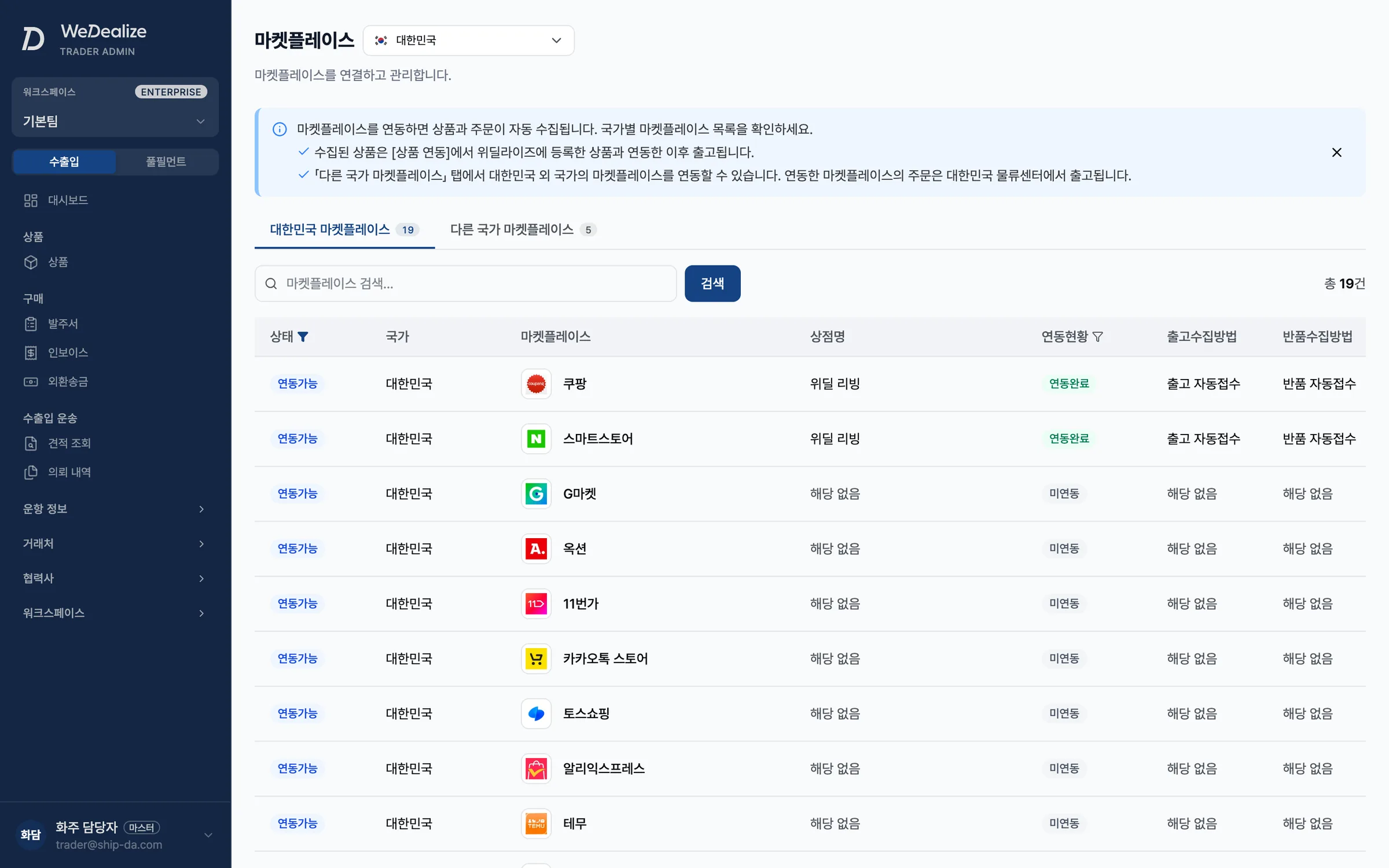
WeDealize trader marketplace list — of 19 connectable marketplaces in Korea, Coupang and Smart Store connected with store name and outbound and returns intake method, while Gmarket, Auction, 11st and others are not connected, plus 5 overseas marketplaces on the other-countries tab (Sample data)
  1. 1Connectable
  2. 2Per-account connection
  3. 3Connected

Integrates with major marketplaces at home and abroad

Handle orders from your connected marketplaces in one place, whatever the country or channel.

  • Coupang
  • Smart Store
  • Cafe24
  • imweb
  • Shopify
  • Gmarket
  • Auction
  • 11st
  • Godomall
  • KakaoTalk Store
  • PlayAuto
  • 10x10
  • CJ OnStyle
  • Shopby
  • Temu
  • Ably
  • Toss Shopping
  • AliExpress
  • Lotte ON
  • SSG.COM

Can you answer these questions right now?

  • Order collection

    These orders — did I collect every one from each marketplace?

    You download orders from each domestic and overseas seller center and merge them in a spreadsheet.

  • Auto outbound

    These orders — did I request outbound for all of them at the fulfillment center?

    You email the spreadsheet to the fulfillment center, then check again that nothing was missed.

  • Tracking number upload

    This shipment — are all tracking numbers uploaded to the marketplaces?

    You enter the tracking numbers from the fulfillment center into each marketplace one by one.

Tracking numbers from the fulfillment center are pasted into the seller center one row at a time. Of the 32 orders from Oct 13, this is only the first.

Marketplace orders and fulfillment center outbound are managed separately, so someone has to connect them manually.

See how far your marketplace orders have gone, on one screen

No need to check each domestic and overseas marketplace separately — order collection, outbound filing and tracking upload status show together by date.

October 13 orders from Coupang and Smart Store come together on one card: 32 orders collected with 1 unmapped product, 30 filed as outbound and 2 on hold, and the tracking number registered with the order now shipping.

Order collection

Connect once and collect orders from every channel automatically

Marketplace connection

Manage orders from every channel in one place

Without downloading orders channel by channel, orders from every connected channel are collected automatically.

  • Connection status for every channel on one screen
  • Outbound and returns auto-intake set per channel to fit how you run it
Coupang and Smart Store seller accounts are connected, so today's 18 and 14 orders — 32 in all — are collected automatically.
Product linking

Complete product linking by confirming auto-match suggestions

WeDealize products with the same seller code or barcode are suggested automatically, so even hundreds of products link in bulk with a single confirmation.

  • Match candidates with the same code or barcode confirmed in bulk
  • Unlinked products that hold outbound shown first
For seller code TB-500, the WeDealize product Stainless tumbler 500ml is suggested by auto-match and only needs confirming; the Coupang cooler pouch PC-GY is still unmapped, with no product picked yet.

Auto outbound

File outbound and returns automatically, and flag held orders separately

Outbound and returns auto-intake

Outbound and returns are filed automatically

Without a separate request to the fulfillment center, paid orders are filed as outbound and return requests as returns once the business days you set have passed.

  • Outbound and returns intake per order shown in the order sync list
  • Integrated outbound managed under the same outbound numbers as regular outbound
Of 32 paid orders on October 13, 30 are filed as outbound automatically and 2 are on hold. 1 return request is filed as a return automatically once the set business days pass. Each order is managed as one outbound.
Outbound hold reasons

See hold reasons right away and cut outbound delays

Without checking channel by channel, see unshipped orders and the action each needs in one place.

  • Hold reason shown for each order
  • Filed again automatically once the cause is resolved
Two orders are on hold: the Coupang order has an unmapped product (cooler pouch PC-GY) and needs product linking, and the Smart Store order has an invalid address (no detailed address) and needs an address fix.

Tracking number upload

Register tracking numbers automatically, and apply cancellations to outbound

Tracking number upload

Tracking numbers are registered on the marketplace automatically

Without entering tracking numbers one by one in each seller center, finish tracking upload for shipped orders.

  • Tracking numbers for packed orders registered automatically
  • Order status switched to shipping on upload
The Coupang order goes from paid to outbound filed to packed; once packed, tracking number 6091 2234 5512 is registered on the Coupang order and it moves to shipping.
Cancellation sync

Outbound for canceled orders is stopped automatically

Without checking cancellations channel by channel, canceled orders are applied to the matching outbound.

  • Marketplace cancellations collected automatically
  • Cancellation status shown in the order sync list
In the order sync list, outbound OUT-2026-000231 stays in shipping, while the row of an order canceled on Coupang (Stainless tumbler 500ml) is struck through and the status of outbound OUT-2026-000232 on the same row changes from filed to canceled automatically.

More you can do

Situations we also support

  • Multi-channel solution integration

    If you gather orders through a solution like PlayAuto, connecting just the solution applies the same auto outbound.

  • Fulfillment center per sales country

    If you sell on overseas marketplaces, orders ship from the fulfillment center in the country you set when connecting.

  • Pause outbound and returns auto-intake

    If processing needs to pause for a promotion or stock check, stop and resume outbound and returns auto-intake per connected account.

  • Multiple accounts per brand

    If you run several accounts on the same marketplace by brand or business unit, connect each one and manage them together on one screen.

Recommended for

Recommended for brands like these

Connected services

Services connected from restocking to domestic and overseas outbound

  • TradePurchase OrdersManage payment schedules, remittance and shipping progress by purchase order.
  • TradeFX remittanceSend supplier payments and check exchange rates and fees in advance.
  • TransportShipment ManagementManage progress and shipping documents for each shipment in one place.
  • FulfillmentInbound, Outbound & StockManage inbound, outbound and return history and remaining stock in one place.
  • FulfillmentImport & Export HubReceive imported cargo and leave delivery to sales channels and export outbound to us.
  • FulfillmentGlobal Multi-CenterRun stock and inbound/outbound at warehouses in each country from one account.

Trade AI

Request order integration work in an AI chat

Handle everything from product linking to outbound auto-intake settings in chat. Requests that change data are applied after confirmation.

  • Link Coupang product PC-GY to Cooler pouch gray
  • Pause outbound auto-intake for Coupang for now
When a member asks to link Coupang product PC-GY to Cooler pouch gray, Trade AI asks to confirm on a card with marketplace product Coupang PC-GY, WeDealize product Cooler pouch gray and SKU ID S000425, noting that orders held because of this product are filed again once linked. When the member presses Link product, it completes the link and displays a button that opens the linked products screen.

FAQ

From your next order,
let it run automatically

Get the brochure or request a consultation.