
The basis for delivery planning: release status of arrived cargo

Manage terminal and bonded warehouse release, free days and excess charges together for each shipment.

Gate In/Out Status brochure request

Leave your details and we will email you the brochure. You can also request a consultation.
Request a consultation
0/2000
Sample data
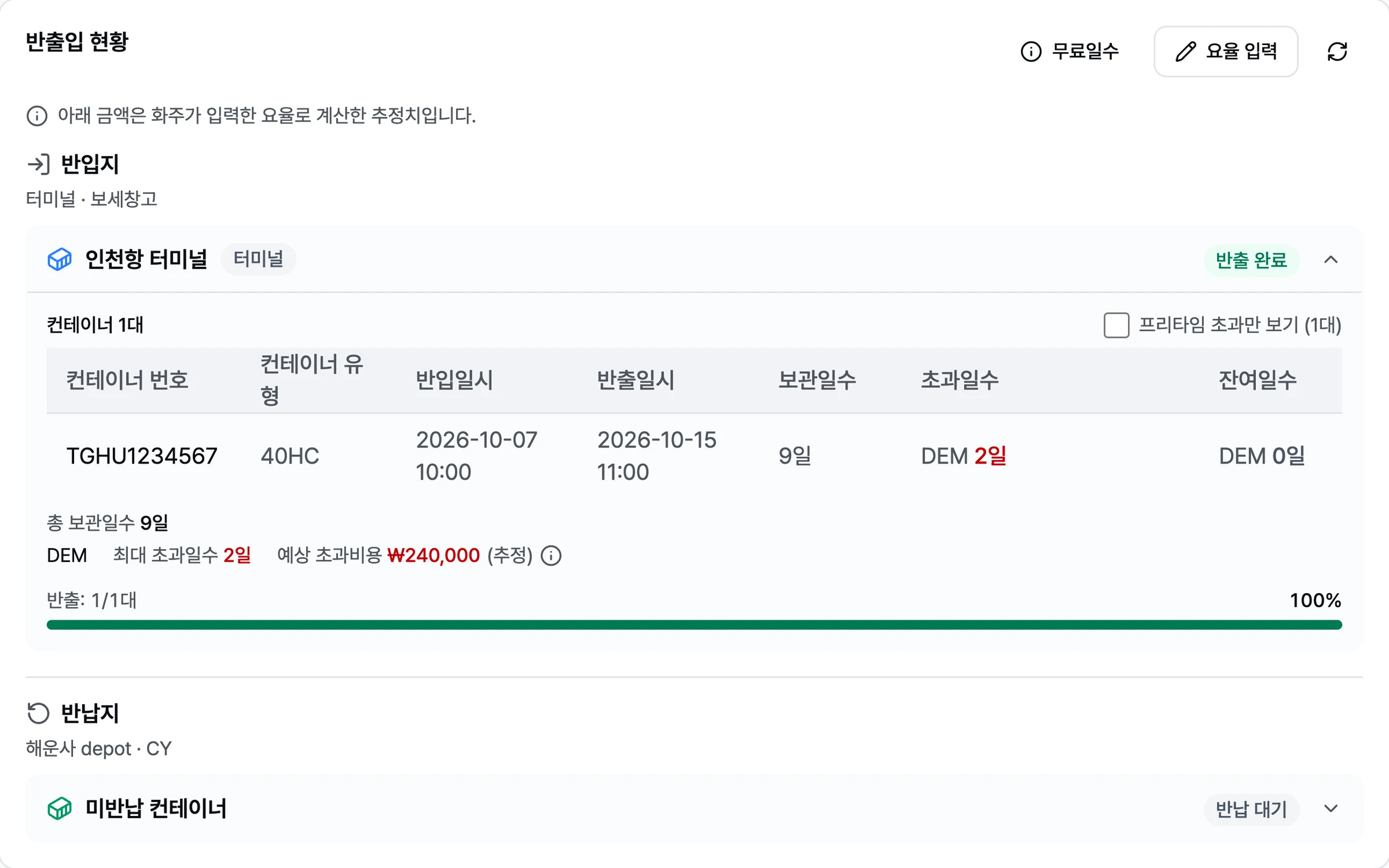
WeDealize trader gate in/out — Incheon terminal released, estimated excess charge, container awaiting return (Sample data)
  1. 1Released
  2. 2Est. excess charge
  3. 3Awaiting return

Can you answer these questions right now?

  • Release

    This cargo — which storage yard is it in now?

    To plan delivery, you ask the forwarder and warehouse whether it has been released.

  • Return

    This container — has it been returned?

    You ask the forwarder or trucker separately whether the container is back.

  • Free time

    This cargo — how many free days are left?

    You count the expiry from the quote yourself and learn of excess charges from the invoice.

The storage charge invoice for SHIP-2026-000409 only arrives on Oct 17. You learn about “Free time exceeded by 2 days · ₩240,000” only after the invoice lands.

Yard and return records are scattered apart from free days, so you have to check release status and remaining days yourself.

Check yard release, container return and free time for each shipment

Terminal, bonded warehouse and return status come together per shipment, so you can judge delivery timing and excess charges in advance.

SHIP-2026-000409 (Incheon) brings three things together: release shows terminal gate in on October 7 and release completed on October 15, return shows awaiting return and 3 days in use (as of October 17), and free time shows expiry on October 13, 2 days over and an estimated excess charge of ₩240,000 from the rate you entered. Sample data.

Release

See release status at terminals and bonded warehouses by yard

Terminal

See terminal gate in and release

Know when cargo is released without separate inquiries, and use it to judge delivery timing.

  • Gate in and release times shown
  • Awaiting, in progress and completed status shown
SHIP-2026-000409, importing, entered the Incheon terminal on October 7 at 10:00 and was released on October 15 at 11:00.
Bonded warehouse

See bonded warehouse gate in and release

Cargo moved to a bonded warehouse shows release status on the same basis.

  • Quantities in and out shown
  • Bonded warehouse free days shown
Cargo moved to a bonded warehouse is counted in packages — 48 CT came in and all 48 CT were released, with 7 free days shown.

Return

See container return progress and days in use

Return progress

See container return progress

Know whether each container is back, without separate inquiries to the trucker.

  • Release and return times shown per container
  • Awaiting, in progress and completed return status shown
Container TGHU 1234567 was released on October 15 and is awaiting return to the depot.
Days in use

See container days in use

Know the period from release to return and judge detention charges in advance.

  • Days in use shown per container
  • Total days in use as of today until all are returned
Container TGHU 1234567, released on October 15, has been in use for 3 days as of October 17, and as it is not yet returned the total days in use run to today, also 3 days (the release day counts as day 1).

Free time

Work out free-time expiry through excess charges in advance

Free days

See free days and expiry

Know the remaining free period without checking the quote again.

  • Free days and expiry from the forwarder's quote applied automatically
  • Excess days counted automatically after expiry
The 7 free days from the quote counted from the October 7 gate in ended on October 13, and release on October 15 ran 2 days over.
Excess charges

Work out the estimated excess charge from your rate

Know the size of charges building up before the invoice arrives.

  • Estimated excess charge shown from excess days
  • Tiered rates with different prices by period applied
Of the tiered rates you entered, days 1–5 over at ₩120,000 per day per container apply, so 2 excess days give an estimated excess charge of ₩240,000 (an estimate). From day 6 the rate is ₩180,000.

More you can do

Situations we also support

  • Free days in working days

    If free days count working days, weekends and Korean public holidays are excluded.

  • Combined free time

    If demurrage and detention free days are combined, they count straight through release.

  • Moved between yards

    If cargo moved to a bonded warehouse, it shows each yard in order and keeps counting free days.

  • Split release

    If cargo is released in parts, see released and remaining quantities as progress.

Customer stories

Companies managing release of arrived cargo with WeDealize

  • Food ingredient import

    “We plan factory receiving ahead from release status”

    We bring in seasoning ingredients by the container and need them released in time for factory receiving. We used to ask terminals and warehouses about release and count free days from the quote ourselves. Now we see release by yard and free-time expiry per shipment, and manage receiving dates and excess charges ahead.

    D Seasoning Importer
    ReleaseFree time
  • Electronics import and distribution

    “We prepare delivery to sales channels as cargo is released”

    We import electronics and deliver them to sales channels in South Korea. We could only confirm delivery dates after checking release with the forwarder. Now we see terminal release and container return together and set delivery dates in advance to match release.

    M Electronics Importer
    ReleaseReturn

Connected services

Services connected from customs to delivery

  • Before releaseShipment ManagementManage progress and shipping documents for each shipment in one place.
  • Before releaseCustoms StatusCheck declaration stages and inspection and quarantine progress for exports and imports.
  • After releaseImport & Export HubReceive imported cargo and leave delivery to sales channels and export outbound to us.
  • After releaseInbound, Outbound & StockManage inbound, outbound and return history and remaining stock in one place.
  • After releaseMarketplace IntegrationAutomate everything from collecting orders on domestic and overseas marketplaces to outbound, return intake and tracking number registration.
  • After releaseGlobal Multi-CenterRun stock and inbound/outbound at warehouses in each country from one account.

Trade AI

Request gate in/out tasks in Trade AI chat

From requesting inbound for released cargo to changing excess charge rates, handle it in chat. Requests that change data are applied after confirmation.

  • Request inbound of SHIP-2026-000409 to the Incheon Wonchang-dong center
  • Change the excess charge rates for SHIP-2026-000409
When a member asks to request inbound of the released cargo SHIP-2026-000409 to the Incheon Wonchang-dong center, Trade AI asks to confirm on a card with shipment SHIP-2026-000409, inbound center Incheon Wonchang-dong fulfillment center and inbound type Import inbound. When the member presses Request inbound, it completes the request and shows a button to the inbound request. Sample data.

FAQ

From your next import,
plan deliveries from release status

Get the brochure or request a consultation.